
Archive your company’s emails. Find them whenever you need.

Archivia keeps your past conversations and attachments in a secure space. Even after an employee leaves, the information stays accessible.
  • Centralized emails
  • Search in a few clicks
  • Desktop & mobile access
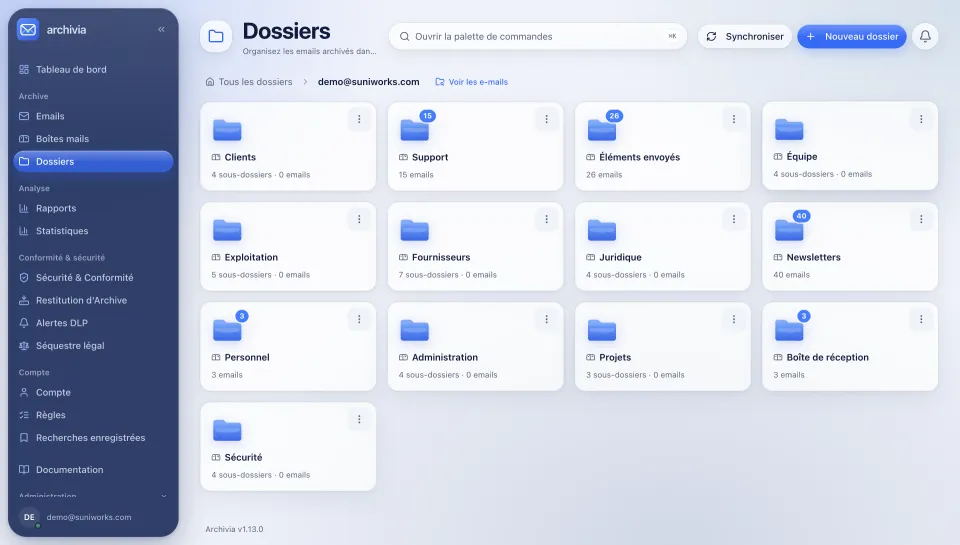
Archivia’s Folders screen: archived emails sorted by folder (clients, suppliers, legal, projects). Interface in French.
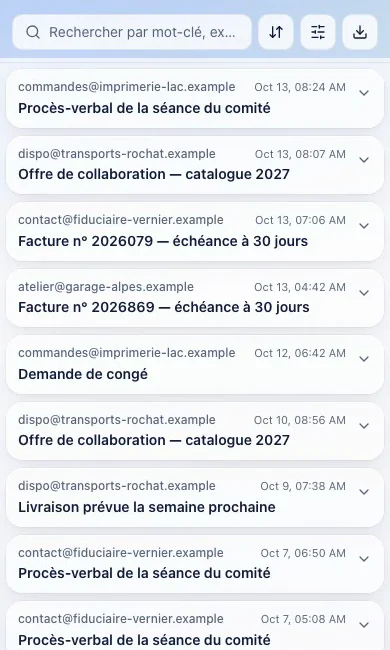
The list of archived emails, on a phone.
Employee who leftalexandre.bernard@entreprise.ch
Archives keptTheir emails stay accessible

Always available, even after they leave.

Sound familiar?

An employee leaves the company

Their emails stay accessible

A client asks for an old document

Find the email and its attachment

You need to back up an exchange

Check the preserved history

Your emails remain your company’s memory.

Archivia gathers your emails from your current and former mail systems, keeps them safe and lets you find them whenever you need them.

  1. 01Your business mailboxes

    Microsoft 365

    Other sources(IMAP, PST, older archives)

  2. 02Archivia gathers and keeps them

  3. 03Search and read whenever you want

Find the right email.
Without digging through dozens of mailboxes.

A simple, powerful search to quickly find your past emails and all their attachments.
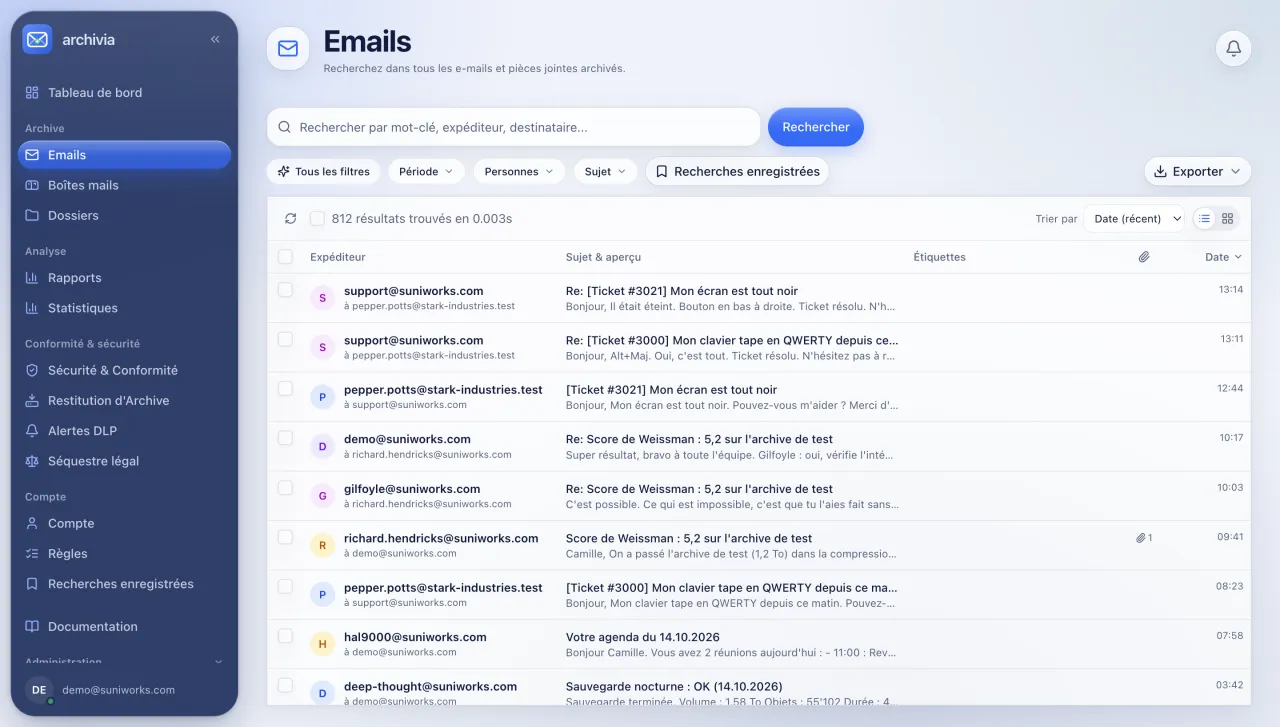
Archivia’s Emails screen: search by keyword, sender or recipient, filters and the list of archived messages. Interface in French.
Demo instance, fictitious data. Interface shown in French.

At the office, at a client’s or on the move. Your archives go with you.

Open your archives from your browser, on a computer, tablet or smartphone.
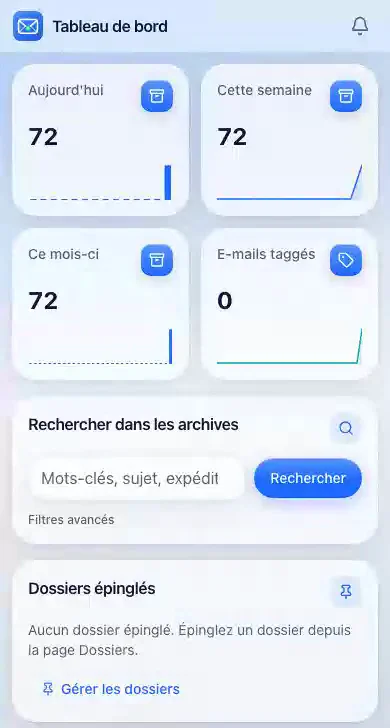
Archivia’s dashboard on a phone, with the archive search.
  • On a computerAt the office or working from home
  • On a tabletSimple, quick access
  • On a smartphoneYour emails, wherever you are

Simple to set up. Immediate benefits.

  1. 01

    Connect your mailboxes

    We help you bring in your current and past emails.

  2. 02

    Archivia keeps the exchanges

    Your emails and attachments are stored in a secure space.

  3. 03

    Find your emails on demand

    A simple search to reach the information quickly.

PRICING IN CHF

Priced per mailbox. Nothing else to guess.

Archive a departed employee’s mailbox, then cancel their Microsoft 365 license. Prices in Swiss francs, excluding VAT.

Leavers and inactive mailboxes

Archive Only

Cancel departed employees’ Microsoft 365 licenses without losing their emails.

1.50CHF per mailbox per month

No long-term commitment

  • Archive the mailbox, then cancel the Microsoft 365 license (depending on your contract)
  • Archived files locked at the storage level (S3 Object Lock, Compliance mode) for the configured retention period
  • Full-text search across messages and attachments (PDFs and OCR-processed images)
  • 25 GB storage included per mailbox (shared company pool)
  • Export your archive in open formats (EML, mbox) with SHA-256 fingerprints
  • Data hosted in Switzerland, on S3 storage that we operate ourselves
Archive departed accounts →
RecommendedActive mailboxes

Full Protection

For the team’s active mailboxes: continuous synchronization and self-service access for every employee.

3.90CHF per mailbox per month

No long-term commitment

  • All features of Archive Only included
  • Continuous synchronization, every 15 minutes
  • Self-service access (staff find their own emails)
  • Direct 1-click download of the original email (.EML)
  • 50 GB storage included per active mailbox (shared pool)
Subscribe →

No long-term commitment · Instance ready within 15 minutes at most

25 mailboxes or more? Business offer

Online, a subscription goes up to 24 mailboxes. From 25 mailboxes the grid above no longer applies: we review your volume and set a separate price and invoicing.

Request a Business quote →
  • Accessible MinimumMinimum of 10 mailboxes per subscription: 39 CHF excl. VAT / month in Full Protection, 15 CHF excl. VAT / month in Archive Only. Maximum of 24 mailboxes online.
  • Shared Storage PoolPooled across the company. Beyond that: 0.10 CHF / GB / month, capped at 25 CHF / month up to 500 GB in total.
  • Free to leaveExport your archive in open formats (EML, mbox, CSV) with a manifest and SHA-256 fingerprints.
  • Hosted in SwitzerlandYour archives are hosted in Switzerland, on S3 storage that we operate ourselves.

Frequently asked questions

Do emails have to be archived in Switzerland?

The Swiss Code of Obligations (art. 958f) requires books and accounting records to be kept for ten years, in electronic form if their integrity is ensured. An email is concerned when it is itself an accounting record, such as an invoice or an order. Archivia keeps and finds your emails: AES-256 encryption, a SHA-256 fingerprint of every message, verifiable export. Retention periods depend on the nature of the documents. Define them with your accountant or your counsel.

Is Archivia compliant?

Archivia is not certified. It provides tools: encryption, a fingerprint of every message, legal hold, a searchable audit log, verifiable export. Your organization’s compliance remains the responsibility of you and your counsel.

Does Archivia offer legal hold and an audit log?

Yes, for the instance administrator. They can place whole mailboxes or the messages of a saved search under legal hold: while a hold is active, no message it covers can be deleted. They can also read a read-only audit log whose SHA-256 fingerprint chain can be verified. These functions have limits: verification does not detect truncation at the end of the log, and sign-out is not recorded in it.

What if you disappear?

Your archive can be exported at any time, in open formats. The terms for returning your data after cancellation, or if the service stops, are set out in the terms and conditions.

Doesn’t Microsoft 365 already archive?

In part. With an E3 or E5 license and an administrator who configures retention, you get features that we do not have. Archivia brings an independent copy, search outside Outlook and a simple way to hand messages over, without keeping a license.

Does AI read my emails?

No AI is built into the offering: your emails are not sent to any model provider.

How long does it take to get started?

Your instance is ready within 15 minutes at most; the maximum set by our terms is 24 business hours. Connecting a mailbox then takes a few minutes.

Who runs the archive inside the company?

We build your company’s instance and hand over a first administrator account. The administrator then opens access for others. On Full Protection, each employee can also find their own messages.

Where is my data?

In Switzerland, on S3 storage that we operate ourselves. Each customer has its own storage space.

Stop losing your important exchanges.

Give your company a lasting, accessible memory, simply.

Request a demo